Leaderboard
-
-

Cameratose
MembersPoints496Posts -
-


Popular Content
Showing content with the highest reputation since 01/13/2025 in all areas
-
How I solved a6700 black screen/flashing red light problem
Dan Delaney and one other reacted to HelloHelloHello for a post in a topic
2 pointsI thought I'd write up what happened to me to help others with similar predicaments. I stupidly didn't read the instructions when I updated the firmware on my a6700. I inserted a freshly a6700 formatted SD card with the firmware update. And proceeded to start the update process. When the screen went black for a few seconds, I thought there was an error and shut off the camera, not realizing this was part of the update process. (I think it's a dumb idea to have a black screen for the update process.) My camera wouldn't turn on. All I'd get was a black screen and a blinking red light on the bottom left side of the camera. I tried all sorts of things for hours upon hours. None of them worked. Here's what did work: I erased the SD card and formatted it in exFAT format on my Mac. Then I added the firmware update. Then I inserted the card and turned the camera on. After a few minutes, the screen turned on. (I think this should be done with a full battery.) Anyways, I thought I'd have to have my camera repaired. But it turned out to be a simple solution.2 points -
Infra Red Experiments
tadwil and one other reacted to Richard A for a post in a topic
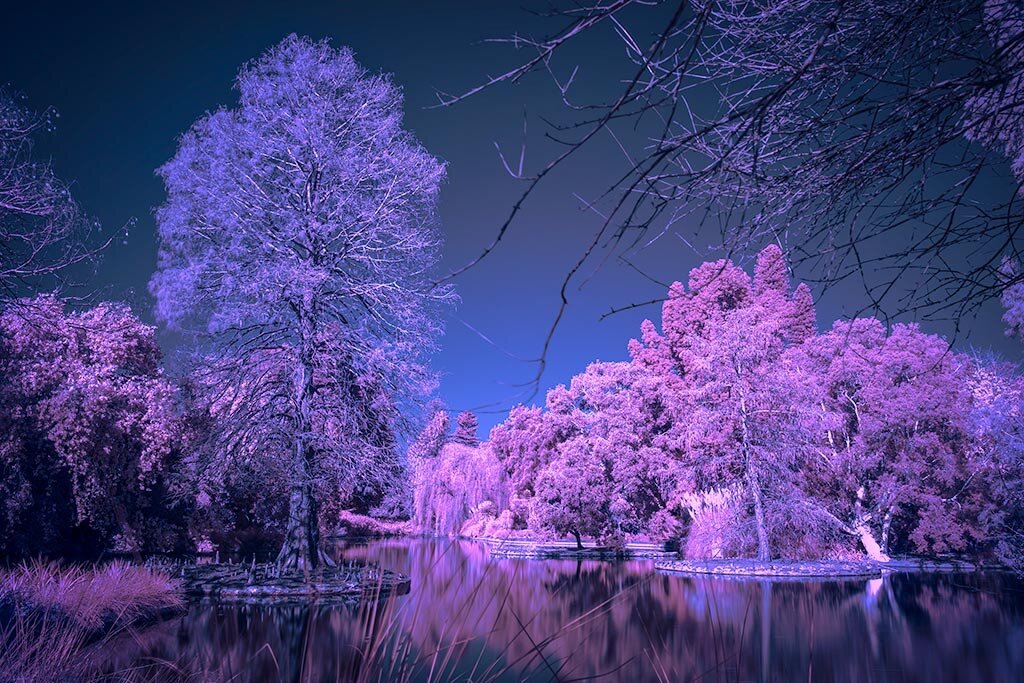
2 pointsHere are some photos I took with my A7R5 a couple of weeks ago in the Adelaide Botanical Gardens while experimenting with a 720nm Infra Red Filter.


 2 points
 -
Hello everyone, here I share a review where I show my thoughs about the drop-in filter system for conventional mirrorless cameras + some idas filters for widefield astro. You have some images that hope they help for you. I will be pleased to answer any question. Cheers. Introduction Astronomical filters are a fascinating tool for landscape astrophotography using conventional cameras. Although they come in different formats and systems, clip-in filters (sensor filters) are the most well-known. While they perform excellently, they have some drawbacks due to their nature: they are difficult to install and remove, complicating the workflow when creating panoramas, increasing the risk of scratching the sensor or getting dust on it during installation, and they are prone to vignetting and aberrations. For all these reasons, drop-in filters have been gaining popularity lately. What is a Drop-in System? Drop-in systems are, in essence, filter holders placed between the lens and the camera. They mimic the filter drawers commonly used in deep-sky astrophotography and allow filters to be used without having to detach the lens from the camera. As a result, we achieve better alignment between filtered and unfiltered photos (which also facilitates panoramic workflows), reduce the risk of sensor scratches or dust, and produce fewer aberrations and less vignetting in the corners. The "downside" of these systems, in the case of conventional cameras, is that they only work with Canon EF lenses in combination with mirrorless cameras (Canon EOS, Sony E, or Nikon Z). That's because EF lenses have a large flange distance, which allows space for the drop-in filter holder between the rear of the lens and the camera mount without affecting focus. Therefore, drop-in systems are (and must be) adapters between these lenses and Canon, Nikon, or Sony mirrorless bodies. Drop in filter system Example of a Drop-in System: the Meike MK-EFT The most popular drop-in filter holder currently is the Meike MK-EFT, but there are others (Canon and Kolari, as far as I know, eventhough they are only available for Canon EF to Canon EOS R). The Meike drop-in is available for Canon EOS R, Nikon Z, and Sony E mounts. It is made of high-quality metal and plastic, includes weather sealing, and has fully functional electronic contacts, allowing autofocus with compatible lenses. This holder supports many native Meike filters (NDs, polarizers, mist filters, etc.), as well as other 2" circular astronomical filters with a compatible drop-in frame-such as those from IDAS, available with frames from either Meike (DRE or DRT) or Kolari. Meike Drop-in filter system Canon EF to Sony E MK-EFT mounted on TT artisans 11mm 2.8 EF lens IDAS Astronomical Filters IDAS filters are well-known in the astrophotography community for their excellent quality and durability. The brand offers a wide range of filters specifically designed for the MK-EFT drop-in system, including both broadband and narrowband options. The filters are sold with integrated resin frames (DRE or DRT models) that perfectly fit the Meike drop-in holder, clicking securely into place. Additionally, Kolari also produces compatible metal-framed versions. I've personally tested three of them: the NBZ II DRE, the GNB DRE, and the HEUIB II with the Kolari frame. All are narrowband filters, with the NBZ II being the most restrictive and the HEUIB II the least. Drop in filters. From left to right, and up to down: Meike clear filter, HEUIB II (with a Kolari frame), GNB DRE and NBZ II DRE Meike drop-in filter adapter + IDAS astro filter mounted on the TT artisand lens and a Sony a7s HEUIB II The HEUIB II filter is designed to block ultraviolet (UV) and infrared (IR) light. It enhances night sky detail while preserving natural colors, resulting in an RGB-style image. Unlike some other UV/IR blocking filters, this one performs well even with fast optics (from f/1.7). It allows H-alpha light to pass, which helps emphasize emission nebulae and other celestial objects, improving contrast and separating the sky background from the main structures. The resulting images have very natural colors, with improved sharpness, contrast, and saturation-making it a great choice for RGB shots or more natural-looking images that don't require filter stacking. IDAS GNB The IDAS GNB filter captures H-alpha and OIII, plus a small portion of the visible spectrum. It is designed to target a wide variety of celestial objects such as galaxies and nebulae, and in landscape astrophotography, it is excellent for enhancing H-alpha. According to the manufacturer, it performs well from f/1.4, and although some haloing is theoretically possible, I have not experienced it. This filter yields rich H-alpha reds along with greenish, bluish, and yellowish hues. Though it is relatively selective, it is highly usable for enhancing winter Milky Way reds without the need to blend with RGB shots. IDAS NBZ II The IDAS NBZ II is a very selective dual-band filter that captures only OIII and H-alpha wavelengths. It has very narrow bandpasses (8 nm and 9.5 nm) and a very high transmission rate (close to 96%), making it highly efficient for H-alpha imaging. It is designed to avoid halos and works well with fast lenses while maintaining high transmission. The resulting images are almost two-tone (red and greenish), with a strong H-alpha presence, so combining them with RGB shots is necessary. Because of all this, the NBZ II is one of the best filters for boosting reds with fast lenses, even under heavy light pollution. Histogram comparison of the filters used on this article. Comparison between different photos (only one shot - no stacking) using the Meike clear filter (15s), the Heuib II (30s), the GNB (100s) and the NBZ II (100s) View: original size Same photos than before with the WB corrected View: original size Conclusions In my opinion, the drop-in system is currently the best solution for using astronomical filters with mirrorless cameras. The Meike version is of very high quality. It is well build, safe to use, does not produce vignetting or aberrations, makes aligning filtered and unfiltered shots easier (especially useful for panoramas that combine both), and supports a wide range of high-quality filters. The only drawback is that it can only be used with Canon EF lenses, which I admit can be frustrating. However, once we understand that this system is actually a way to use a wide array of astro filters with conventional cameras-not a limitation on lens choice-we will start enjoying all its benefits, which are far superior to those offered by clip-in filters. As for IDAS filters, their quality is top-notch. The NBZ II easily captures H-alpha even under severe light pollution, and its results rival those of any high-end H-alpha filter, with the added benefits of dual-band imaging (easier integration, better image quality, etc.). The GNB, though less restrictive than the NBZ II, performs very well under dark skies without needing RGB stacking-especially in winter. Lastly, the HEUIB II is excellent for RGB-style imaging, providing beautiful colors, reducing light pollution, and enhancing H-alpha. It is a great option on its own or in combination with the NBZ II or GNB for more impactful results. Panorama done with the NBZ II with no RGB images combined (only one shot of 100s for the sky, with the GNB) Panorama done with the NBZ II in combination with RGB images. Only one shot of 100s with the NBZII for the sky combined with one RGB shot of 20s)2 points
-
I'm very disappointed With Sony Lately
Jeffreykmd and one other reacted to FunWithCameras for a post in a topic
2 pointsIt seems entirely reasonable that they disable a video mode that requires a bit rate faster than any standard SD card can manage to an SD card (SD cards can be rated V30, V60, or V90) - if you try to record a video mode that would require something faster like a "V200" card then they don't let you. OK, you have some non-standard hack that pretends to be an SD card, but records faster - seems perfectly sensible that they don't support it considering they look at the card to know how fast a rate the card can handle. Pretty sure that Sony is protecting users who try to use a slow SD card to record a video mode that requires more speed than the card supports, and Sony has the camera say "you can't do that" rather than fail dismally to try to record it - can you imagine the complaints if the user got a recording that stuttered and captured a few frames then a gap then a few more frames? Feel free to complain, but don't expect sympathy. You tried something that isn't supported, and it didn't work. As far as I know, Sony cameras are the only ones that support two different formats of cards, AND let you have two matching cards of either format. Every other camera that supports two formats has one of each. There are quite a few cameras that support two matching slots, but they only support one format of card (eg: the Z9 support two CFexpressB cards), so you don't have the option of a second format. I like the flexibility - I don't have have enough CFeA cards to cover everything - I can use CFeA for some and SD for others. Yes, CFexpressA cards were fairly expensive in the beginning (back 4 years ago in the A1), and I paid a fair bit for a Sony 180GB CFeA card. But a few years later I spent the same amount for a Lexus CFeA 320GB card, and just recently I spent almost exactly the same amount for a Prograde 480FB CFeA V4 card (which is over twice as fast to load into the computer). The price falls as there is more competition. Interestingly, measurements have shown that cameras like the Z9 cannot write at full speed to their CFeB cards (presumably because they get really hot - they write only as fast as CFeA speeds 🙂2 points -
Using a Sony Alpha NEX-F3 without a lens.
cheddarman reacted to Pieter for a post in a topic
1 pointI guess it helps if you know specifically what you're looking for 😅1 point -
Using a Sony Alpha NEX-F3 without a lens.
Pieter reacted to cheddarman for a post in a topic
1 pointThanks Pieter for the answer, and the sarcasm!! I've spent hours trawling the internet!1 point -
Menu --> Settings --> Shooting settings --> Release w/o Lens --> On Sometimes I wonder why people take the effort to ask a question while a simple Google-search on 'Sony Alpha NEX-F3 manual' will get you the result in less than a minute...1 point
-
Help! Sony A6400 shorted hot shoe?
Cameratose reacted to pytn3 for a post in a topic
1 pointFactory reset didn't work, so I ended up taking apart the camera and unplugging the hot shoe cable all together... and it worked! No more error messages, just a non-functional shoe mount. I wonder if I bent a pin in the hot shoe or something... oh well!1 point -
1 pointYeah, you need some remote controller to used it in bulb mode...1 point
-
Long(er) exposure for A7 IV?
big0bum reacted to Cameratose for a post in a topic
1 pointI think that's it. 30 seconds or bulb, but there's no bulb timer.1 point -
HDR mode - help please!
Dairylander reacted to tadwil for a post in a topic
1 pointI wonder if you have seen this YouTube video by Gary Fong which was uploaded 10 years ago with an A7R camera: There is a time lag after the shots are taken to generate an HDR image but possibly the time lag is shorter with newer cameras? I didn't like the HDR images that I have seen before that had exaggerated exposure values but this one looks good to my eyes.1 point -
HDR mode - help please!
Dairylander reacted to XKAES for a post in a topic
1 pointAs mentioned, the features depend on the camera -- and I can't speak to Canon either. On the a900 &a850, there are several DRO (Dynamic Range Optimization) settings -- None, Auto, Advanced, and "manual". (Different from HDR, DRO is an additional way of handling high contrast scenes with processing IN-CAMERA) This provides an amazing ability to tone-down high contrast scenes -- but, just as with the Canon, the internal processing of the images slows things down. How much? It depends on how many images, the quality, and the amount of adjustment. It can also be combined with bracketing. You can read about it -- with examples, on line. Search for DRO, not HDR.1 point -
HDR mode - help please!
Dairylander reacted to Cameratose for a post in a topic
1 pointThe short answer is HDR is only going to do so much. Blown out highlights are blown out highlights. The good news is that Sony underrates their sensors. Most people I know tend to overexpose a stop or so. You can pull an awful lot of detail out of what appears to be blown out highs. From another post: As near as I can tell, the last camera (at least FF) that included HDR was the A7 III. The A7R III has it, so do the A9 and A9 II. While I didn't check them all, the A7R IV, A7 IV, A7R V, A9 III, and A1 do not have in-camera HDR. They do have HLG, a single frame high dynamic setting, but it's only available in HEIF format. Without knowing which Canon you're using; there's a good chance that a newer camera of almost any brand would surpass it in dynamic range. However, I wouldn't plan on achieving the kind of results you're seeking without putting some effort into processing, unless you put some time into really learning the camera's abilities and limitations.1 point -
Sony RX100 M7
Cameratose reacted to Terry_Robinson for a post in a topic
1 pointThankyou Cameratose (& Advertisement). I'm very grateful. Regards. Terry1 point -
What for a SD card back-up?
Alforno reacted to Cameratose for a post in a topic
1 pointUpload them to a computer or tablet.1 point -
Recently have been having some weird AF issues on my A7iii
Lauren- reacted to Cameratose for a post in a topic
1 pointLauren, that user hasn't been here for almost two years. In answer to your question, the description of what he calls 'focus breathing' sounds more like 'hunting', where the camera can't find focus so it 'hunts' back and forth. There can be a couple of reasons for this, Pieter describes one above. Another can be too low of a light source. These cameras need enough light to see the subject, and enough contrast to find focus. Depending on the camera, that amount of light varies. The A7 IV, for example, is rated better in low light AF than some of the earlier models. In order to stop the camera from making a shot when out of focus, go into the menu and turn on 'release on focus' so it only makes the shot when in focus. If you leave the release on 'balanced' it will sometimes take a shot even if not in focus.1 point -
A6000 flash sync speed only goes to 1/60
Cameratose reacted to Luijo for a post in a topic
1 pointHi FWC, thanks a lot and I get your point but that wasn´t the issue. BTW, the A6000 has mechanical and electronic first curtain but only mechanical second curtain and it doesn´t affect the sync speed either way, that I noticed. Turns out that it was the flash I was using with that camera. I updated the firmware (again) and problem solved, It goes to 1/160 now and works just fine. Thanks a lot for your help!🙂1 point -
Paul Robinson
Cameratose reacted to Paul Robinson for a post in a topic
1 pointHi thanks for your reply, the card is ok tried it in my other camera1 point -
Sony A7II & 50mm f0.95 lens mayday mayday mayday
Pieter reacted to Cameratose for a post in a topic
1 pointOk, so I tested it, same result. Had to change the shutter with the dial. Then it hit me. 🤔 I only shoot in manual. Never tried it any other way. So, I flipped it to A, and it works as you say. Change the aperture and the camera changes the shutter. It also works in P. Mea Culpa!1 point -
Sony A7II & 50mm f0.95 lens mayday mayday mayday
Cameratose reacted to Pieter for a post in a topic
1 pointThat's untrue. The camera doesn't need to know the aperture settings, it just measures light intensity hitting the sensor and - if in A-mode - determines the appropriate shutter speed to get a correct exposure. I have several dumb manual lenses and without any electronic coupling, the camera is perfectly capable to set the proper shutter speed. This sounds like a very plausible explanation. If you see 1/4000 blinking, it means the camera can't get proper exposure because it has hit the maximum possible shutter speed.1 point -
Sony A7IV autofocus can't keep up
Cameratose reacted to Pieter for a post in a topic
1 pointOut of pure curiosity: if you're that much frustrated by Sony's approach to photography, why on earth are you still here? Stop complaining, sell your Sony stuff and buy whichever brand you like. We don't care, apparently noone here is bothered by these Sony 'bottlenecks' as much as you are. All brands have upsides and downsides. You either make do with the compromises that go with your brand or you move elsewhere, but this is not the right place to find backup for all your gripes. This isn't about fanboyism, it's just that most people here make do with the compromises that go with Sony as those impede their usecase less than the compromises that go with Canon or Nikon or whatever other brand.1 point -
Funny story, I had an SD card that always corrupted one specific photo. What I think it happened was thet some bits were flipped when writing to that specific region. I could still download the photos but opening them they were half pink and half distorted. I kept using that card eventually since I only did photos for my self but after a few years I upgraded to something else because of the size of the card. Now to answer your question: I would low level format it in camera or in Mac a few times and I'd use it in order to test it if it fails. Benchmark it, write some files on it, fill it up, copy the files back, etc. Stress test it. It it fails under the stress test, then you need to buy another card, if not and only some files are corrupted, then expect that it will go bad (or it might not, but assume it will) and then ask yourself if it's woth buying a new card now or losing some photos and buying it later. Now it depends on how much do you care about that photos. Working for a client? Buy a new card. Hobby? If it's bothering you buy another card or use the second slot to save JPEG/HEIF and download the corrupted files from there. BTW, I never got rid of the corruption of only one photo on that card.1 point
-
A7rIV eyecup
big0bum reacted to Steven Pratt for a post in a topic
1 pointIt just seems a tad small for my specs. Thanks for suggestion. I’ll give them a look.1 point -
A7rIV eyecup
Cameratose reacted to big0bum for a post in a topic
1 pointI'm also wearing glasses and I'm curious what's wrong with the original eyecup? Anyway, search for JJC eyecups on Ali, they are pretty cheap.1 point -
1 pointIf you're not after the latest and greatest, might I suggest buying used lenses? If you end up disliking the lens, you can sell it again at hardly a loss. Much cheaper than renting.1 point
-
Choosing a new lens
Alforno reacted to Cameratose for a post in a topic
1 pointI dislike renting as well, but if you don't have any friends you can borrow from and no local stores you don't have much choice. I guess whether it's worth it all depends on how much money you're risking if you don't like the lens. One thing you can do is read/watch reviews and above all, look at sample photos from the average person. Those are more valuable to me than any review. Many forums have active photo pages with forums dedicated to specific lenses. Also, check resellers like MPB, who offer a liberal return policy and a 180-day warranty on their gear. I have used them successfully many times.1 point -
Minolta 1200 AF Macro Flash adapter for Alpha 7R-V camera
Cameratose reacted to michelb for a post in a topic
1 pointHere 80PX on the left and 1200AF on the right. Notice the different connectors on the top to connect the Ring Light 1 point
 -
Minolta 1200 AF Macro Flash adapter for Alpha 7R-V camera
Cameratose reacted to michelb for a post in a topic
1 pointI have both 1200AF and R1200 (which was introduced at the same time as the MFC-1000 but is essentially the exact same flash) and they use the same flash to controller connector. Tried on Minolta Maxxum 7D, Sony A700, A900 (DSLR with no EFCS) A77, A77M2, A99 (DSLT with EFCS), NEX-7, A3000, A7R, A7M2 ( Mirrorless with EFCS) The issue with compatibility happens when you try to use the original Ring light controller that uses a different TTL protocol so it can only be used in Manual at full power. Some even say the second generation of 1200AF ring lights (was marked on the box as 1200AF (n)) which were supplied with a Minolta FS-1100 adapter to use on i series bodies is even less compatible than the 1st generation. All my tests with either the 1200AF or the R1200 connected to the MFC-1000 controller have worked out perfectly. The only potential issue is if your body uses the EFCS (Electronic first curtain shutter) it has to be disabled to ensure maximum TTL exposure accuracy. If not disabled, you may experience overexposure likely due to the fact the Pre-Flash is now issued on the sensor instead of the shutter blades on mechanical shutters. This difference likely causes misreading of the pre-flash and wrong power level reading from the camera and wrong request for power to the flash . The previous Minolta Ring Flash called the Auto 80PX had a different ring light to controller connection so that one can not be used at all.1 point -
Can't get sharp photos without tripod
Cameratose reacted to dustinjm87 for a post in a topic
1 pointJust took this photo with the rokinon off my front step. Probably cropped in 400%. Can't say for sure as I just used Lightroom on my phone and the detail is still great. 1 point
 -
Can't get sharp photos without tripod
Cameratose reacted to dustinjm87 for a post in a topic
1 pointYou are right, the whole adaptor world is much more complicated for Minolta than for rokinon manual lenses. Probably not worth my effort in the end since an adapter that will give me functional use of those Minolta lens will run hundreds of dollars. I just attached my rokinon 50mm to the a7 for the first time and the results are awesome. Possibly better than the Sony 50mm I have. I can crop in to like 200% and things still look nice. Which just reinforces my thoughts on the 55-210 having an issue. Maybe I'll look for some m42 mount older telephoto lenses and go from there1 point -
New member with Sony questions (current Nikon user)
Pieter reacted to Cameratose for a post in a topic
1 pointFollowing up as requested. I've been asked to shoot an awards banquet next weekend. Normally I'd go a few more months until just before the beginning of the season to clean my sensors, but the banquet is important so I did a sensor check, cleaned lenses, etc. Now to be clear this wasn't very scientific. Last year I left the shutter open on power down, but rarely changed lenses in the field opting to use two bodies instead. This year, I had the shutter close when powered down, but rather than carry two cameras all the time I changed lenses...a lot. The results were... 🤷 For the A1, there was a small amount of dust on the sensors in both cases, very similar results I'd say. Last season I had to use a wet swab to remove whatever gunk wouldn't come off after the internal cleaning/jet blower/dry swab. This year, I was able to stop at the dry swab, no wet swab needed. The A7 IV was incredibly clean. Admittedly it saw little use at the track last year, for that matter all year, it needed nothing after an internal shake and bake and jet blower. For that matter it may not have needed anything at all, but I didn't check before I did the internal cleaning. I think the A7 IV results can be discounted. Not enough use to get any kind of comparison. The A1 is a different story. The amount of dust with shutter open or closed was very similar, the difference was in gunk. It occurs to me that whenever these discussions are held they're always about dust. That's probably fair because it's what most people would encounter. In my case there are a couple of airborne liquids that could settles on my sensor, the most likely being track glue and unburned fuel. The problem with those is that I never, ever remove a lens when either one is present. Absent those, I have no idea. From a dust standpoint, I don't see any difference.1 point -
How many pixels is overkill?
Pieter reacted to Cameratose for a post in a topic
1 pointThis is highly dependent on the expected output medium. I have 22" x 28" prints in my office from a 20MP M-4/3 camera that look great, but I upscaled them before printing. I also have 33MP images printed the same size that have been cropped, no upscaling needed. I bought an A1 for two reasons: MP and speed. The speed is self-explanatory as I shoot action. The MP takes a bit more discussion. The vast majority of people look at images on a tiny little cellphone screen. For that, almost anything will work. 1MP will fill the bill. A typical 'good' computer screen is actually 4K, which translates to 4096 x 2160 pixels display resolution, or 8.8MP. You need 8.3-ish MP to meet 4K minimum. Given that, an 8-10MP camera will give you a solid image on a 4K monitor. So, why do I need 50MP? There are times when I'm shooting that distance is a problem. Things happen fast and sometimes I can't be as close as I'd like. Many times, the subject is moving away from me, quickly. In those cases, I have to crop to get the desired composition. I try not to crop too much because I sell my shots, and sometimes the buyer wants the subject to be 'closer', which means even more cropping. As long as I'm selling a print it's not a big deal because I can control what goes out. The problem comes when the buyer wants the digital file that the customer buys the full rights to. Flyers, hero cards, advertising, etc. Most of these people have no idea how cropping can affect the final product. They could take a 24MP file, 'cut out' the part that they want which could end up 3 or 4MP, print it at 24" x 30", and then wonder why it looks all blurry. From my standpoint, I want there to be as many MP in the digital file I send out as possible. I just feel safer having the extra resolution in case it gets butchered.1 point -
Shutter or Exposure problem, Intermittent, when using high s
Cameratose reacted to Steveatesh for a post in a topic
1 pointThanks Cameratose, I gave it a very brief test this afternoon with nothing untoward but you’re right, I should give it a long test. The camera actually makes the shutter noise when this happens, it’s only when I look at the image I see it has faulted, but like you I’m inclined to think it’s the shutter.1 point -
Lens to compliment 70-200 2.8 GM OSS ll
Cameratose reacted to Pieter for a post in a topic
1 pointWhat converter are you talking about? The number of lenses compatible with E-mount teleconverters is actually pretty limited because lenses not designed for use with a TC will just not physically fit: the front elements of the TC protrude beyond the lens bayonet, colliding with the rear lens element. 1 point
 -
I'm very disappointed With Sony Lately
Jeffreykmd reacted to Cameratose for a post in a topic
1 pointAre your purposely obtuse? You still haven't read the post accurately, you've only commented on what you want. You don't like them, Sony pisses you off, we get it. You can stop defending your position to me, I don't care. If I were you, I'd sell off all my Sony gear and move on to a brand that suits you better. Or better yet, find a forum with people that will sit around and commiserate with you, since that seems to be your main desire.1 point -
SLT-A58 memory card format
Cameratose reacted to LongHairedDavid for a post in a topic
1 pointI would stand up in court and state that this item wasn't on my menu but there it is and I have formatted the card. Thank you very much. David1 point -
Somethings wrong with my RAWs, I believe
Cameratose reacted to Highchiller for a post in a topic
1 pointYeah, I only upgraded the firmware due to a bluetooth bug and the upgrade luckily fixed it. I noticed the new RAW version because I tried to open the ARW files in Sony's own Imaging Edge Desktop program and that worked before the firmware upgrade. Afterwards, they didn't open anymore. However, the "Image Properties" section and the thumbnails of the image were still visable. So i can browse my library but cannot open them in large or in the editor. So I searched for differences in the Image Properties panel and found that the ARW files after the firmware upgrade show under "file type" now "ARW 5.0 (Lossless) Format" while the files before the firmware upgrade to 4.0 showed "ARW 4.0 (Lossless) Format". Note that I do not see these properties in the Windows file properties section but in the Image Edge Desktop program. Anyhow, it seems I found the issue here. First the "Imaging Edge Desktop" app was actually not up to date even though the software told me that it was and the exe-filename didnt change either. A full uninstall and re-install solved the issue (don't trust exe-file names from Sony, I guess). Now that I can finally open the RAWs again, I see they look absolutely fine with Sony's software. So the issue must be with Affinity Photo 2. And indeed, I found that many people complained before that RAWs looks way too dark. It seems to be a common issue with them as those posts date back couple of years. Thank you for your help though!1 point -
Zoom position potentiometer replacement?
Cameratose reacted to Austin Susan for a post in a topic
1 pointWhen my lens is working, it functions very well. When the camera goes into power save and comes out again with press of the shutter button, it frequently won't refocus at 600mm. It takes a specific set of conditions to reproduce the problem. FWIW I don't use any filters. Mine is not an isolated incident. There are lots of pointers online, but many mention the symptoms (won't focus at 600mm, or beyond 300mm or so) and don't directly mention a faulty potentiometer. Many mention intermittency. When I first had the issue, it seemed to only be with my A7RV so I thought it was similar to the infamous compatibility issues between A7RIV and 200-600. Sometimes turning the camera off and back on again "fixed" it immediately for me, sometimes, releasing the lens and reattaching it seemed to fix it, sometimes cleaning the contacts seemed to fix it. All of these, of course, require that the camera be turned off. While the problem seemed to start with the A7RV, it later began occurring when the lens was mounted on my a7iii. It took me awhile to realize the problem repeatedly occurred after my cameras came out of power save. It would focus at 300 mm or so, but not any longer focal length. When I chatted with Sony, I got no satisfaction, just the suggestion to send it to Precision in CT... at a minimum cost of about $550 plus shipping and insurance. Here are just a few pointers: This one alludes to the problem: https://www.fredmiranda.com/forum/topic/1835471/ This one mentions it farther down in the thread: https://www.dpreview.com/forums/thread/47384931 point -
1 pointThanks Quigsby. Just figured it out tonight... new software that Sony released last week seems to have wholly fixed it. Now getting good shots consistently.1 point
-
Bokeh?
Jeffreykmd reacted to Cameratose for a post in a topic
1 pointNo idea why the image has stopped showing, and no idea why this forum is set so you can't go back and edit. An administrator needs to change that setting. 1 point
 -
"Kaohsiung 2025" video showcases some of the key tourist spots in Kaohsiung city. Doing a tour via a timelapse video has become a way for me to explore the sights and remember the experiences more deeply. Throughout the journey, there will always be moments of highs and lows - new photo spots and angles unlocked, missed opportunities, good and bad weather. All of these contribute to creating a lasting memory for myself. Equipments Used - Sony A74 - Viltrox 16/1.8 - Tamron 28-75/2.8 - DJI RS 3 Mini1 point
-
SONY A6300 MISSING FILES - FILES R IN CAMERA BUT NOT IN SD
Cameratose reacted to dr1nkw4t3r for a post in a topic
1 pointYeah I believe I did delete some files in-camera during my shoot. I just really needed the file space during that time. Bu Thank you for the advice!1 point -
Hybrid shooting
Cameratose reacted to Pieter for a post in a topic
1 pointNot sure if this is in all cameras, but apparently gamma settings might affect RAW files while using PP. But gamma settings only:1 point -
I'm very disappointed With Sony Lately
Cameratose reacted to Jeffreykmd for a post in a topic
1 pointI agree with Cameratose. You picked the system. CFexpress-type A work great. I use them without any complaints.1 point -
Sony A1 II critical issue with new features
FunWithCameras reacted to Cameratose for a post in a topic
1 pointSpammer looking for clicks.1 point -
1 point1 point@kresch - The intervalometer is still good for night shots, just not really dark skies as needed for the milky way. But as I mentioned earlier, there are workarounds which I've been using successfully, for example in the timelapse I took below. Still haven't heard whether it's been fixed on newer models such as A7IV or A7RV.1 point1 pointHey guys I would like to share some of my latest shots. Equipment used: A7II, FE55/1.8, FE90/2.8M, FE35/2.8 Divided by Mathias, auf Flickr Into the Mist by Mathias, auf Flickr Pencil by Mathias, auf Flickr Ablaze by Mathias, auf Flickr Withered by Mathias, auf Flickr Swiss Mountain Panorama by Mathias, auf Flickr Dark Side by Mathias, auf Flickr1 point
A6700 Levelling indicator
milesmaxwell reacted to malboni for a post in a topic
1 pointI finally found it in the online manual. 😂1 pointThoughts on a6700 + 70-350mm F4.5-6.3 G OSS + teleconverter
FL Guy reacted to FunWithCameras for a post in a topic
1 pointSony only supports teleconverters (both the 1.4x and 2x) on a select group of lenses - all of them white, and not even all of the white ones (for example, the 70-200 f/4 mark 1 does not support a teleconverter). One possible reason is that the lens has to be designed with room at the body end to receive the part of the teleconverter that sticks out. There are "conspiracy" theories that suggest Sony wants you to buy expensive lenses to use teleconverters. I don't believe that, but hey, there are plenty of posts online making those claims. Anyway, you can find lists of supported lenses on Sony's website under both the teleconverter pages. From memory (so I might miss one or two): 70-200mm f/2.8 GM both mark 1 and mark 2 70-200mm f/4 G II (only) 100-400mm GM 200-600mm G 300mm GM 400mm GM 600mm GM I think that's all the lenses that can be used with teleconverters. I have seen a few reports that there is at least one Sigma lens which can be used with a Sony teleconverter, but I don't remember which lens (or lenses). And before you ask, there are no third party teleconverters for the E mount (unlike, for example, Canon's EF mount, where there are multiple third party teleconverters). Apparently the reason that there are no third party teleconverter has to do with Sony licensing - they license out the lens side of the mount, but not the camera side of the mount - I speculate that maybe Sony want to keep the option to innovate on the camera side?1 point